One record for every resident. Evidence for every inspection.
HIRA by Involgix, built on the CareFlow AI platform, is one system for the whole home: the HIRA manager web app, HIRA Care Web for carers on any browser, and the HIRA Carer Agent tablet app for point of care recording. Priced per registered bed, with every module included.
Mapped to the CQC single assessment framework; UK GDPR.
Person-centred care planning, eMAR, handover, rostering, finance and compliance in one record.
AI that proposes; a named person confirms. Resident identity is masked before any AI call.
mng.hiracare.uk
HIRA manager web, Aldersmead Care Home demo data.
Insight rail: act, escalate, dismiss with a reasonVoice: one question at a time, confirmed before it saves
The system watches, proposes and records. The manager confirms.
Most care software is a set of modules you log into, and evidence you reconstruct before an inspection. HIRA is organised around the questions a home asks every day, and the evidence accumulates as a by-product of the care.
What is usually sold
Modules you log into one by one. Records you type after the care. Evidence you assemble in the week before an inspection. Add-ons priced per module and per user.
What HIRA does
Background agents watch the record and raise what needs attention. AI drafts the plan, the handover and the proposal; a named person confirms. Every confirmation is audited, so the evidence is already there when the inspector asks. One price, every module.
Owner Copilot
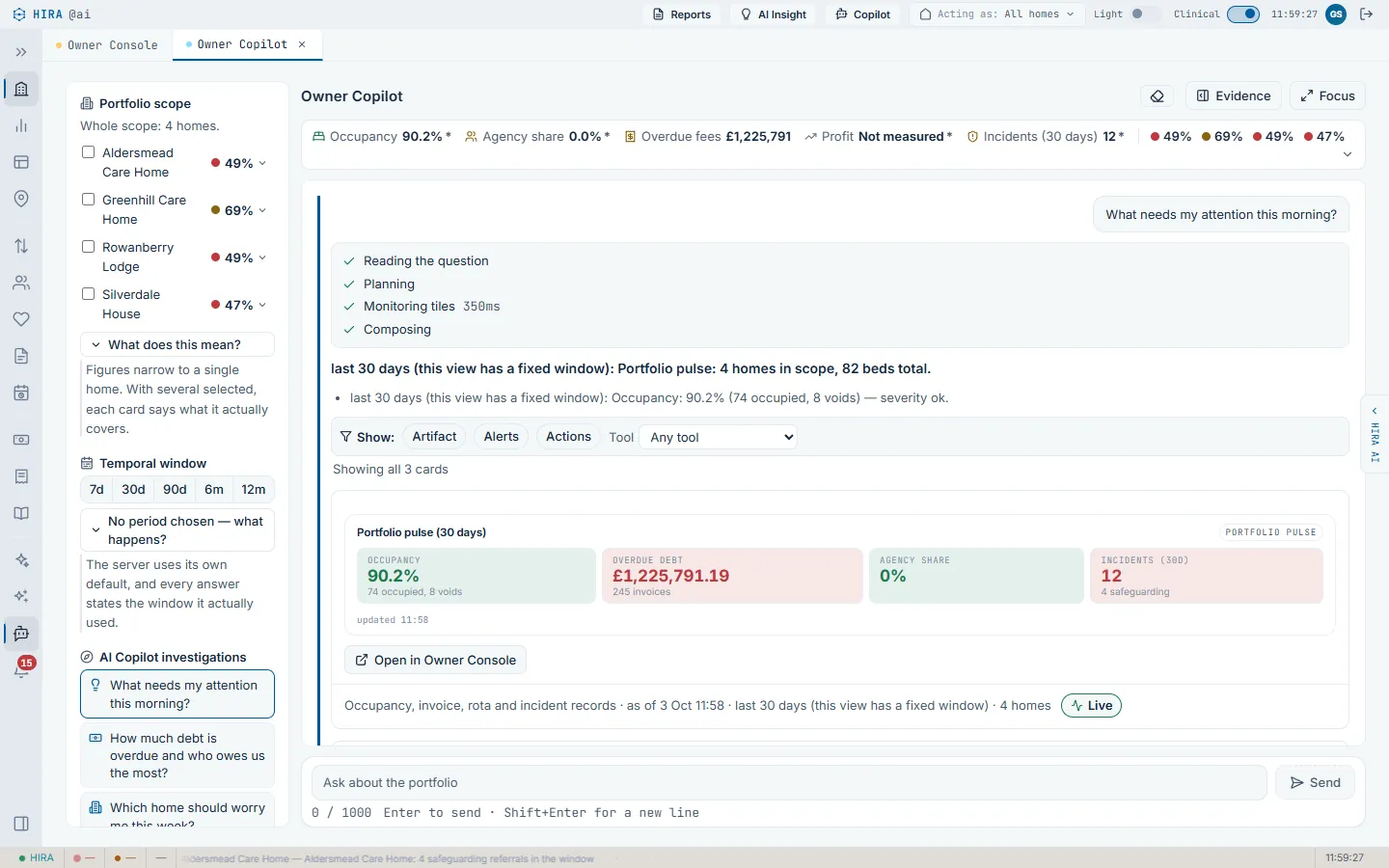
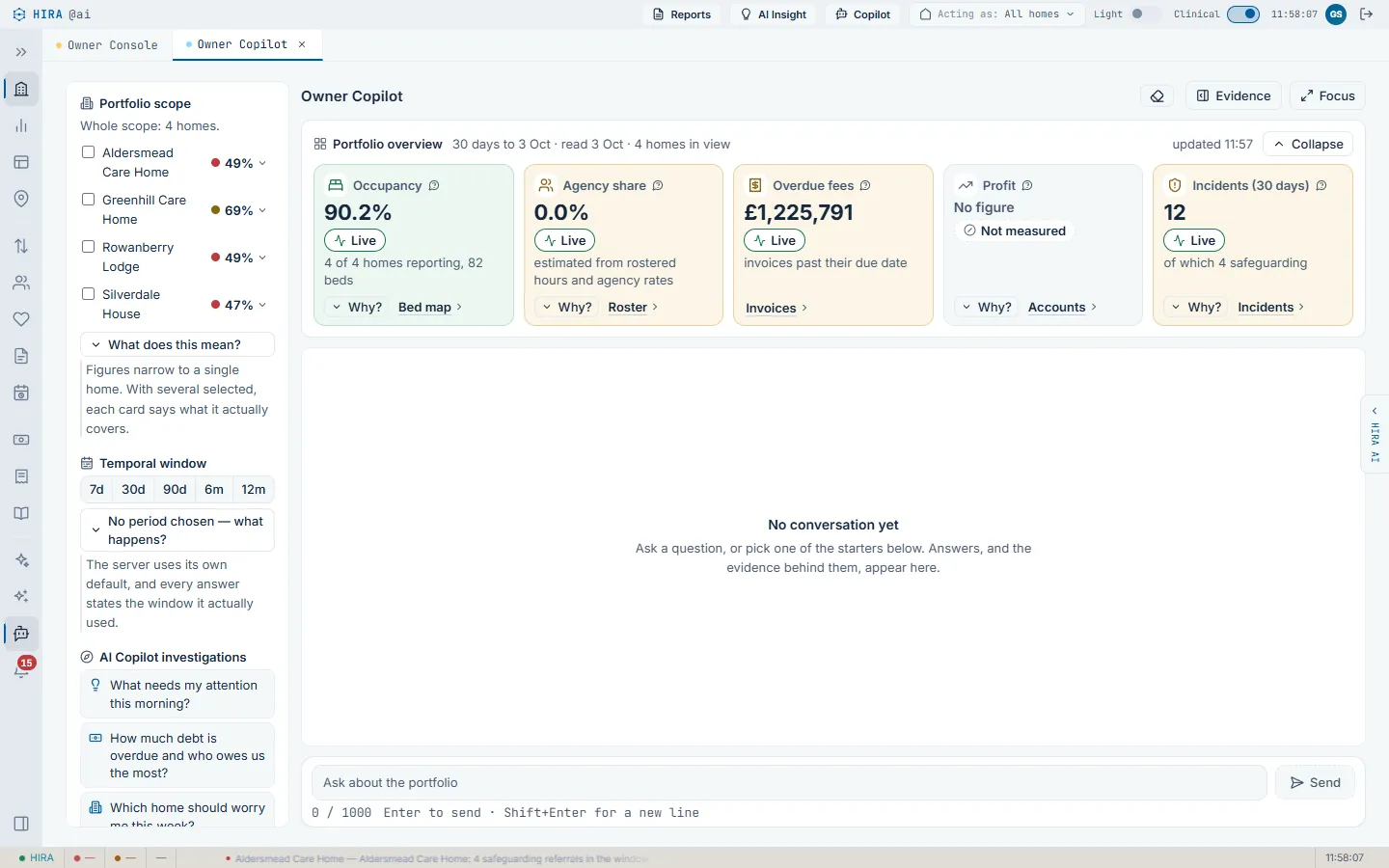
For directors and regional managers with more than one home. Ask a question in plain English and the copilot answers over your own homes only, within the portfolio scope your login already has. Every figure is grounded in the data behind it; where a figure cannot be grounded, the copilot says so rather than guessing.
A weekly portfolio brief, delivered automatically to each director and regional manager.
Coverage notes and a provenance statement with every answer; a missing value is never shown as zero.
Home scores and comparisons across the group, from the same data the managers work in.
mng.hiracare.uk
A question over the whole portfolio; the answer names the records it read and the window it used. Demo homes and figures.
mng.hiracare.uk
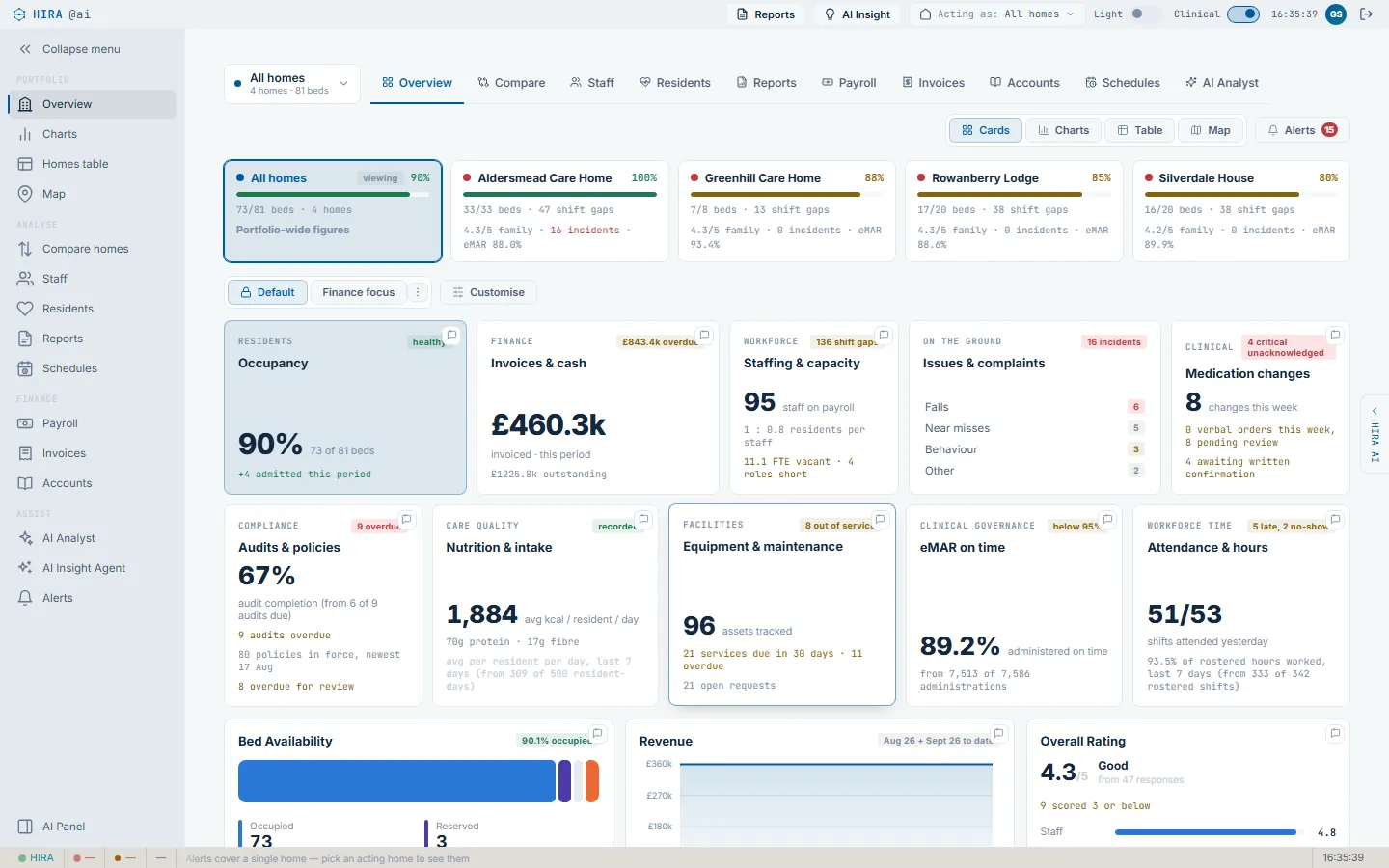
Before a question: the portfolio overview, each tile marked live, and the homes in scope.
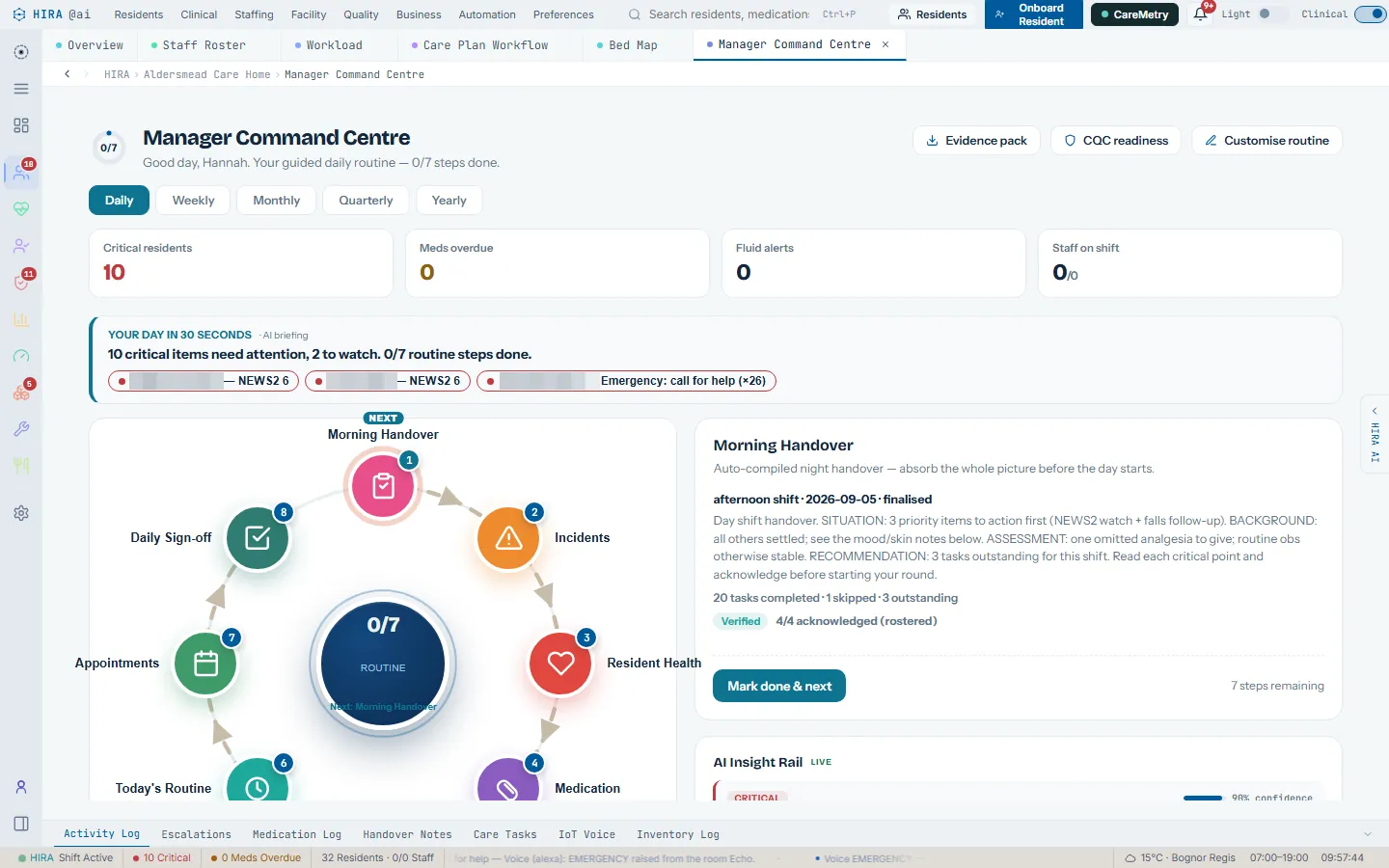
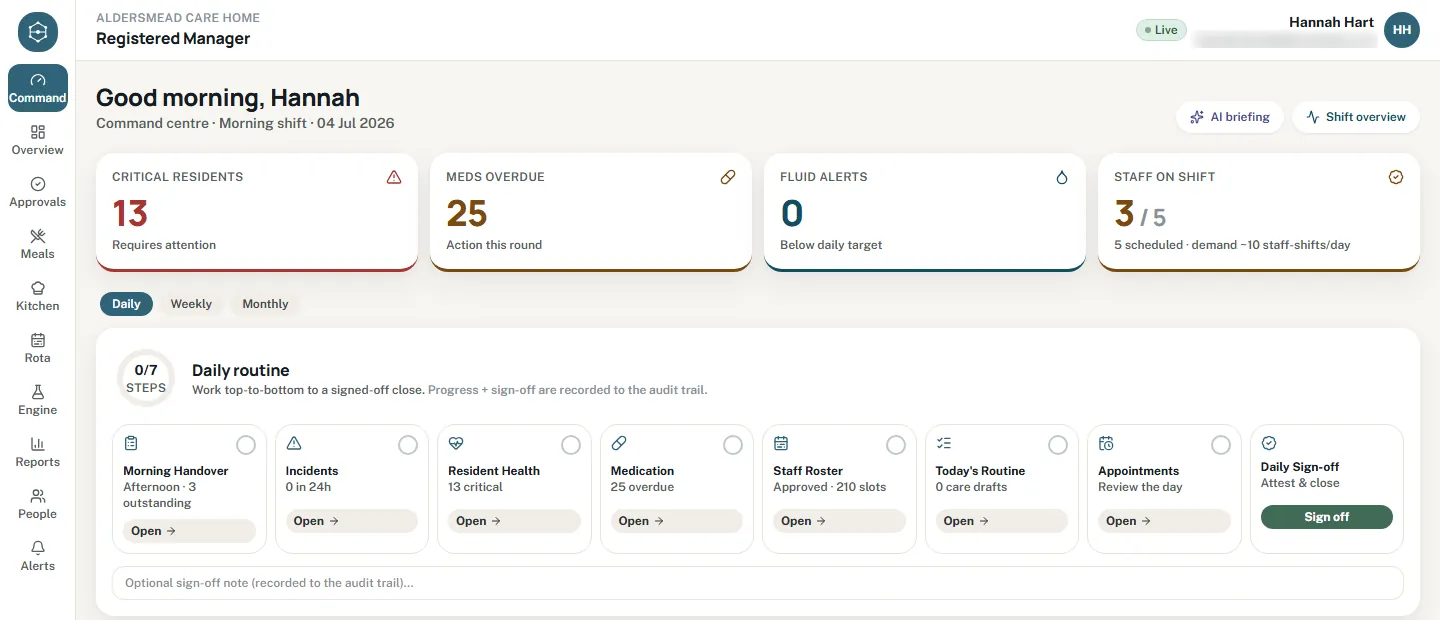
Manager command centre
The registered manager's single working screen. The day opens as a routine of steps, handover, incidents, critical residents, medicines, roster, care plan reviews, and ends in an audited sign-off. Each step deep-links to the screen that answers it, so the menu is the question, not the module. Weekly and monthly routines sit beside the daily one.
Live KPI strip and a NEWS2 deterioration ranking on the same screen.
An insight rail where each item is acted on, escalated or dismissed with a reason, and the choice is recorded.
A background watch chases an unsigned day, with the day's progress attached.
careweb.hiracare.uk
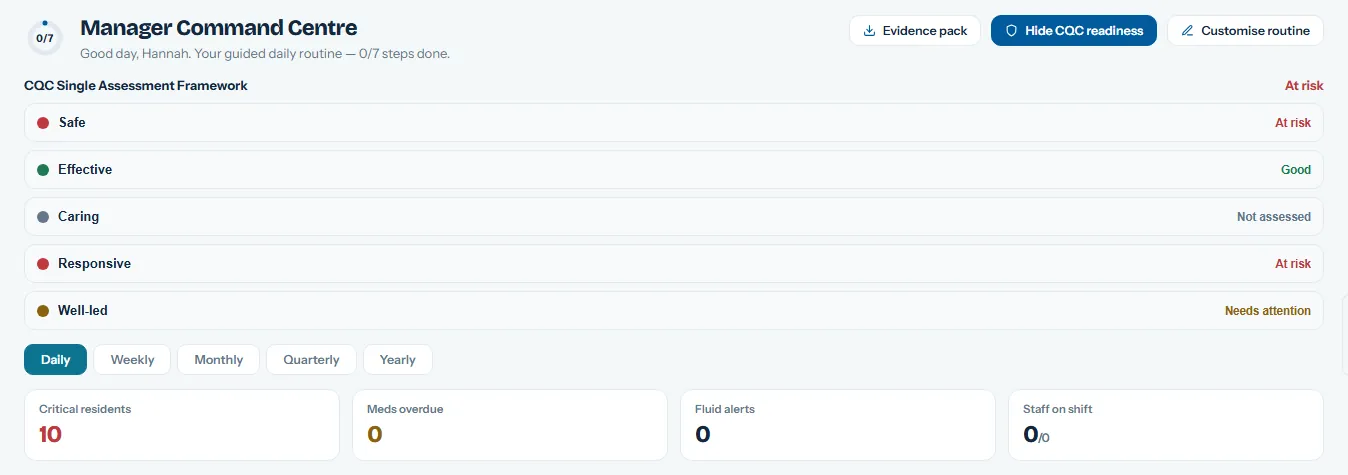
The daily routine as one row, ending in sign-off. Progress and sign-off are recorded to the audit trail.
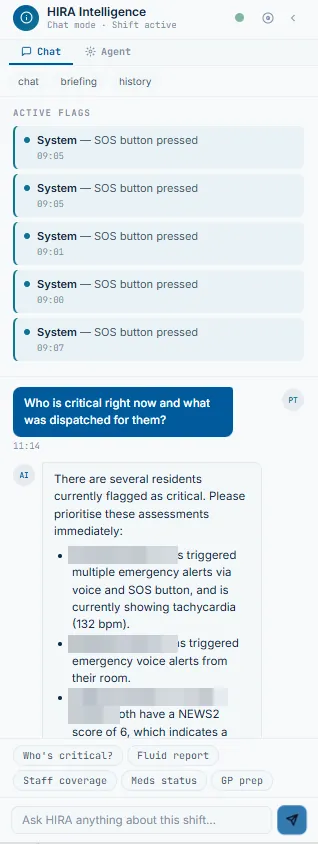
Ask AI, with voice
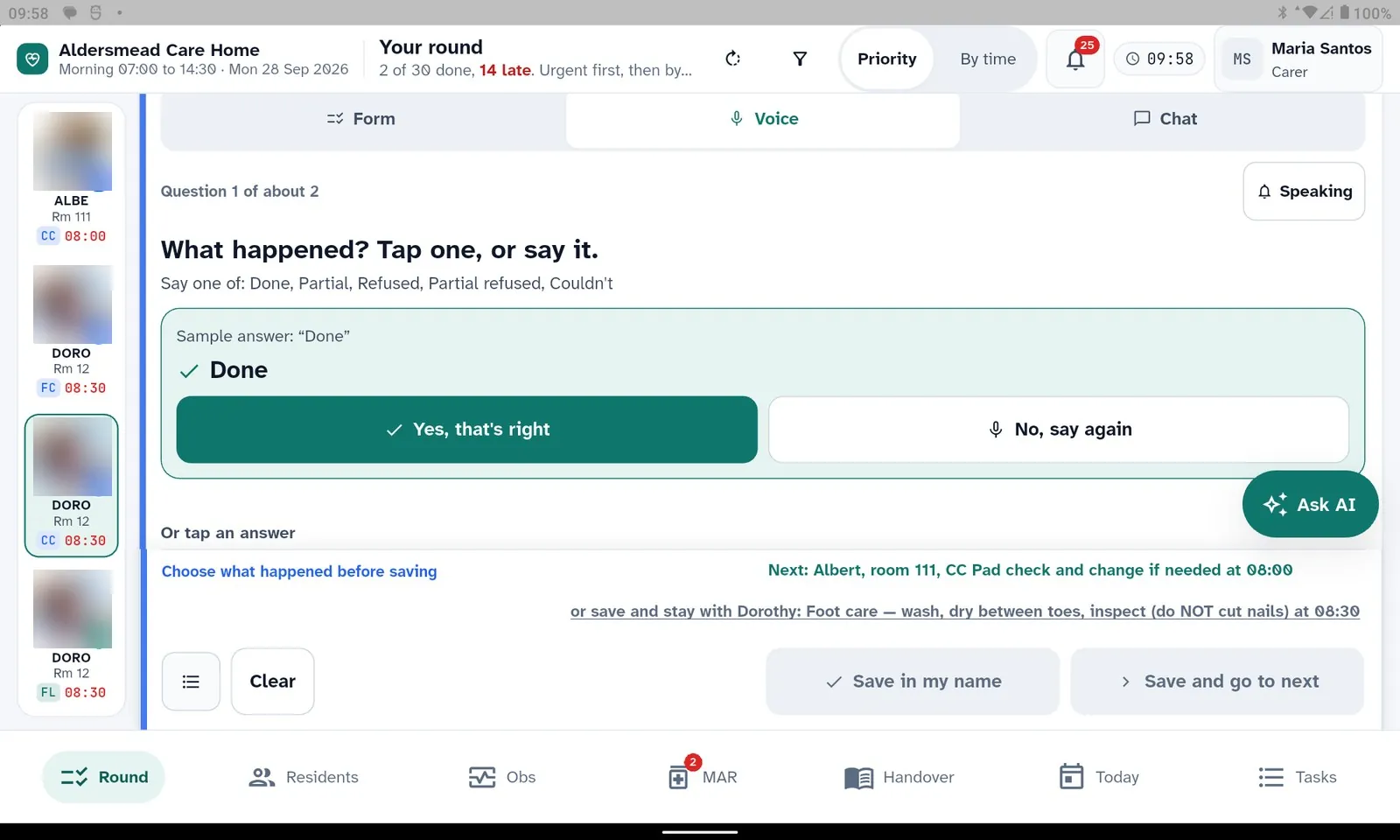
Ask a plain-English question from any screen in the manager web app, scoped to the resident and the pane you are looking at. On the tablet, a carer records care by voice: the app asks one question at a time, reads it aloud, shows what it heard, and will not save until the carer confirms it.
Speech is recognised on the device; the carer accepts or re-records each answer.
Before anything reaches an AI model, names and identifiers are replaced by stable aliases; the answer is unmasked on the way back.
Every AI call is logged, masked, and kept for a configurable retention period.
Ask AI in the manager web, scoped to the shift on screen. Names blurred for this page.
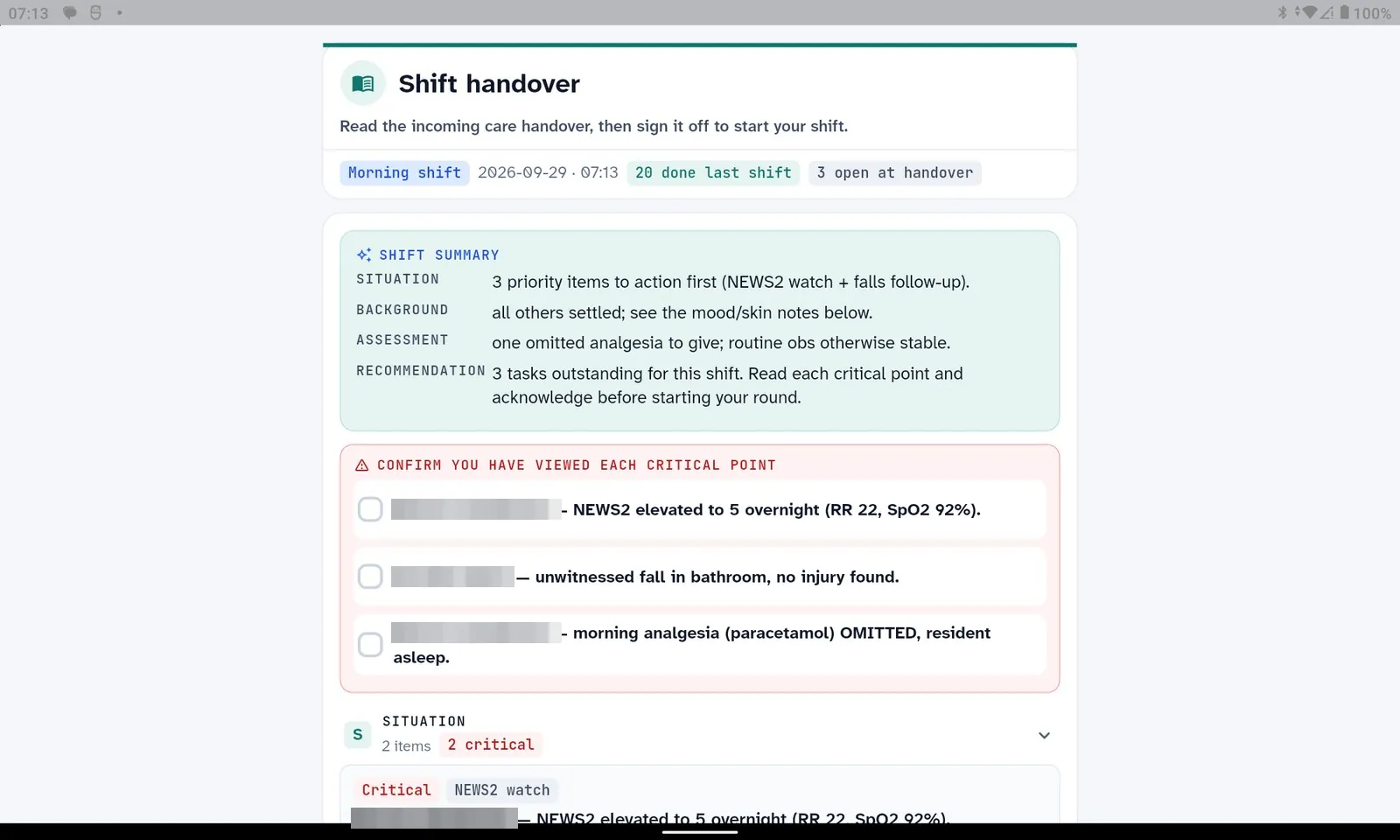
The start-of-shift gate on the tablet: each critical point is ticked before the round opens.
AI agents that work in the background
Thirty-two scheduled agents are in the code today. They scan the record on a cadence, proactive alerts every fifteen minutes, the care-steps planner overnight, the fluid rules every fifteen minutes, and raise what a person should look at. Each is switched on per home from the admin pane, and most are deterministic first: the alert is complete without AI, and AI only adds the wording.
What an agent raises: the reason it fired, and a person's three choices. Names blurred for this page.
HIRA Care Web and the HIRA Carer Agent tablet
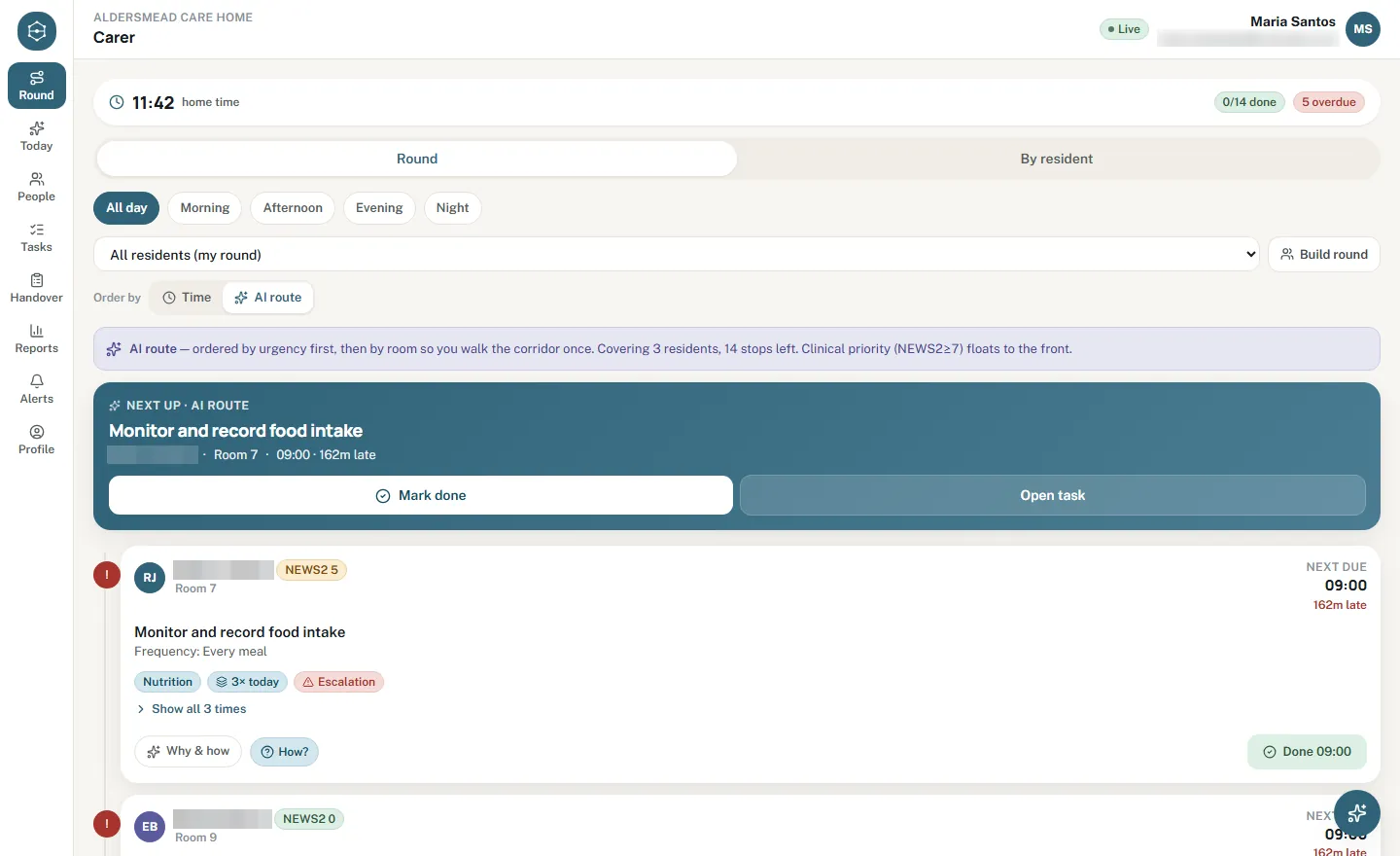
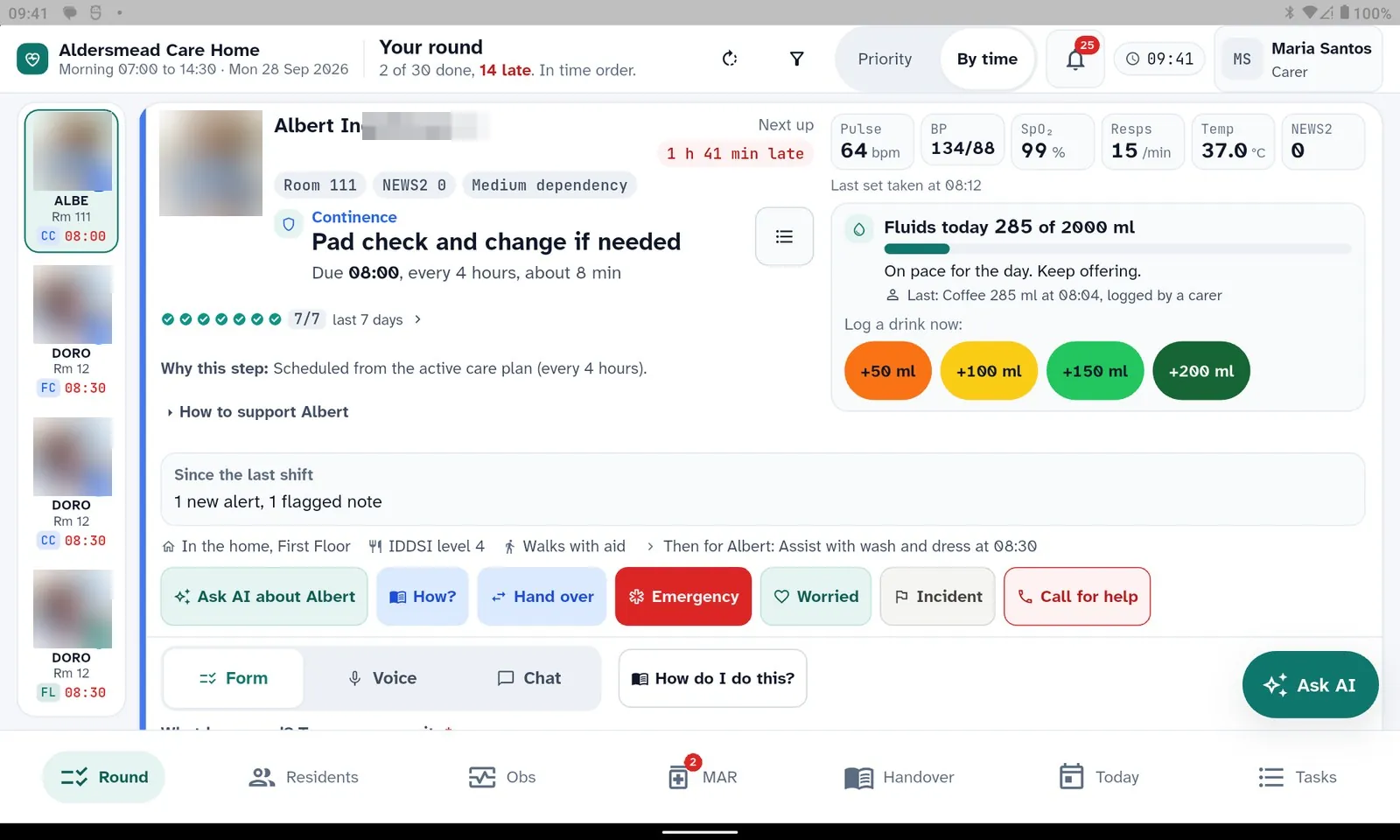
The carer's round in time order, generated from each resident's care plan and the home's own routine: get-up, meal sittings, drinks offers against a fluid target or limit, activity sessions as offers that can be declined, and clinical steps for the nurse. A step that needs two staff is planned as one.
Offline-first on the tablet: a record saved without a connection is kept in encrypted storage on the device and sends itself when the connection is back. Sending twice cannot make two records. Medicines are never queued.
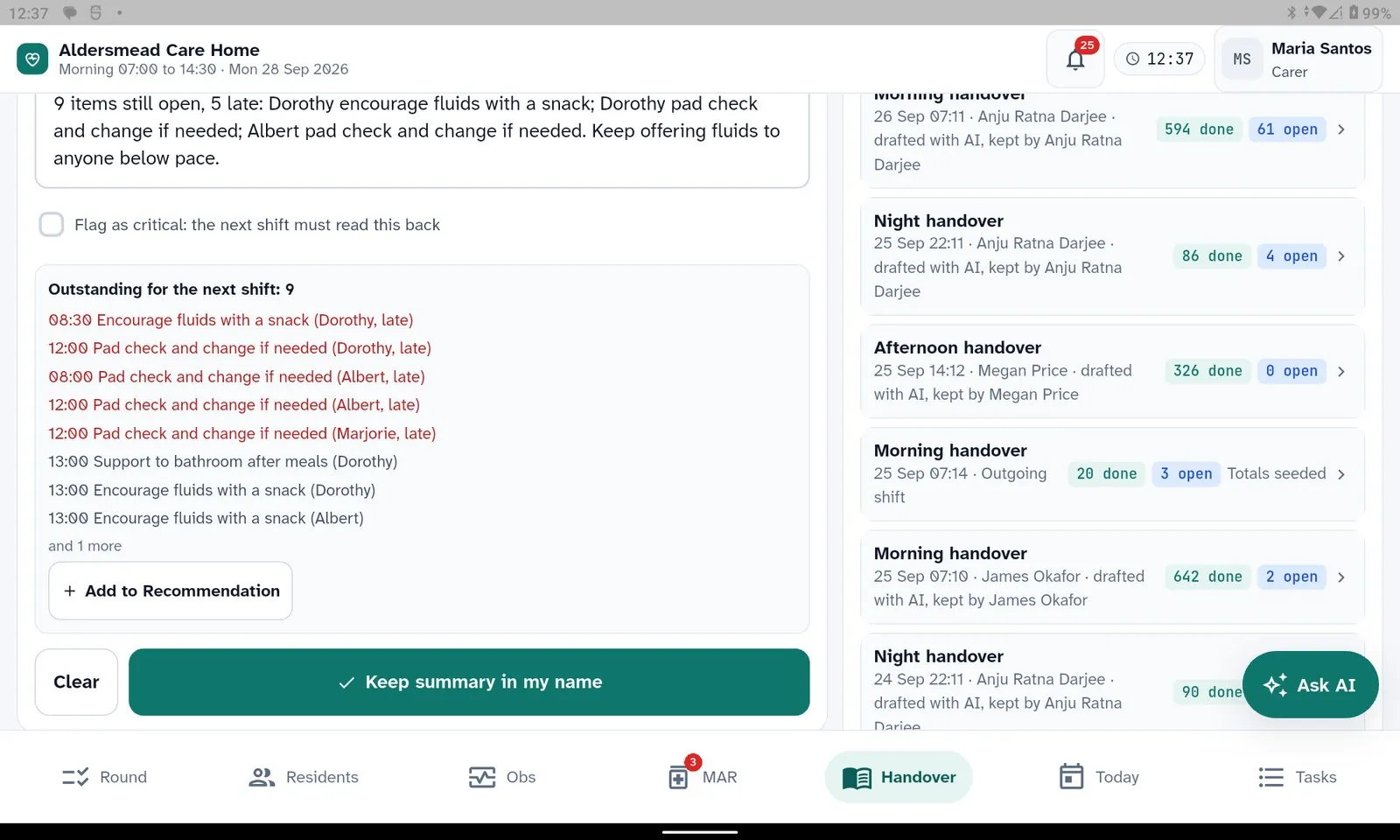
Hand a task to the next shift with what they need to know, who should pick it up and by when; mark it as must-read and it becomes a critical point at the next sign-on.
The start-of-shift gate: a carer reads and signs the previous handover, ticking each critical point, before the round opens.
careweb.hiracare.uk
The round on any browser, with the next step up. Names blurred for this page.
One resident record, care planning and import readiness
Person-centred care plans hold needs and timed interventions; the planner turns them into the round. The CareTally dependency instrument scores each resident into a band and the required carer and nurse hours per shift, so staffing is argued from assessed need rather than habit.
Moving from another system: records are mapped, dry-run and imported one resident at a time, with a verify-and-undo step per batch.
The mapping report leads with the columns the import did not consume, and the onboarding tracker shows, per resident, whether care is safe to start and what is still missing. The home sees before go-live what the old system never recorded.
An intake wizard, AI-assisted collection from pasted notes or a PDF, and a nudge agent that chases incomplete records.
careweb.hiracare.uk
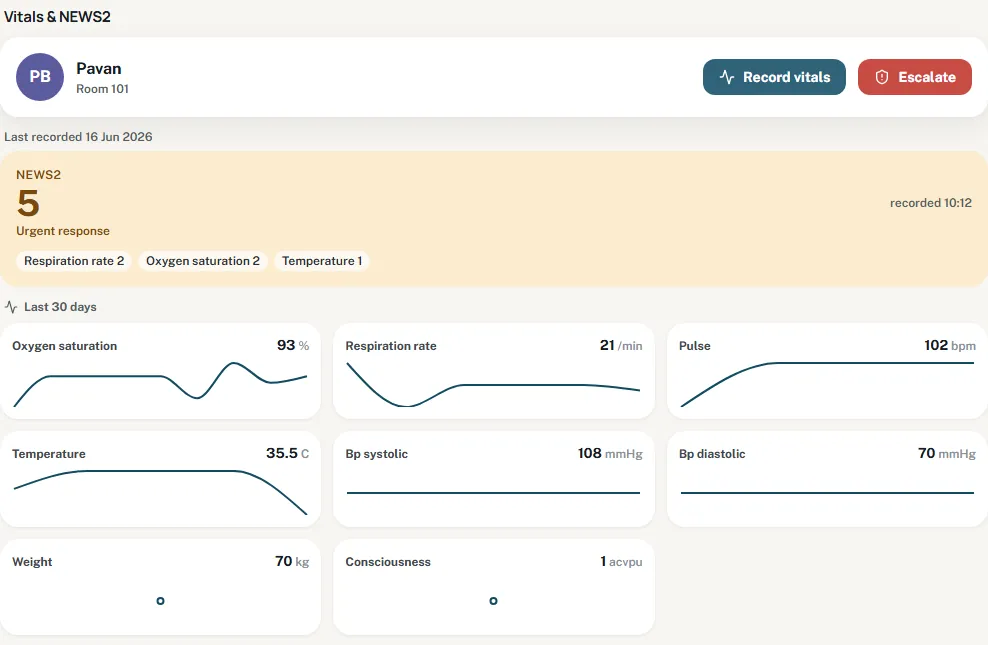
The nurse's clinical view of the same record: NEWS2 with its contributing observations and 30-day trends.
Compliance layer and audit
Upload the home's own policies and HIRA parses them into clauses with a real content hash, so a changed policy triggers re-acknowledgement. AI proposes which clause maps to which operational indicator; a manager confirms; only then does an evaluation run measure the clause against real records. Whatever cannot be measured is recorded with its reason, never silently dropped.
Per-resident access restrictions: a restricted record shows the carer that it is restricted rather than showing nothing; a break-glass read is an append-only audit event.
Photography consent is one predicate used everywhere a photo could appear, including the family portal.
Staff vetting data is kept on a retention schedule and unusual sweeps of vetting records are flagged.
mng.hiracare.uk
The readiness view over the CQC single assessment framework, inside the command centre.
Finance and operations
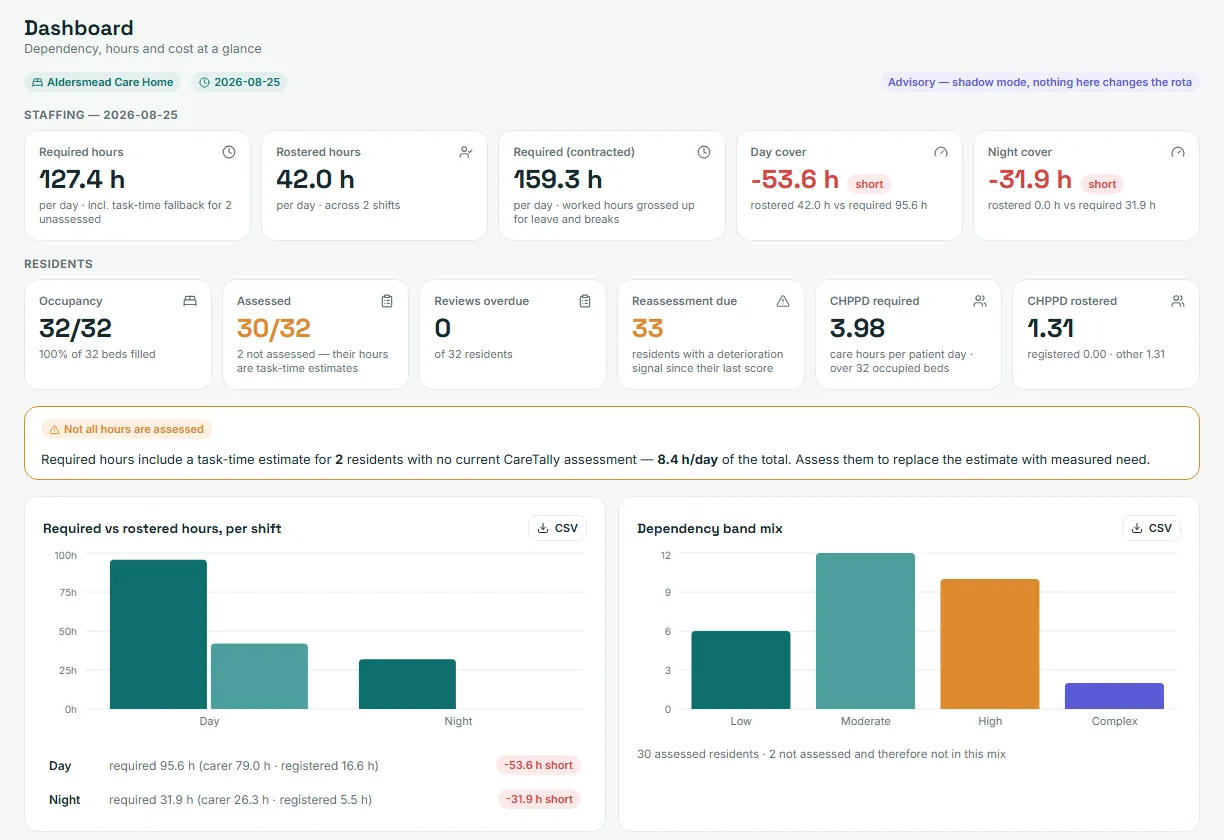
Rostering with dependency-based staffing: required hours from assessed need against rostered hours per shift, care hours per resident per day, and the band mix. Weekly caregiver allocation can be auto-drafted for a manager to approve.
Occupancy and bed map, enquiries and intake, resident absences and their charging.
Funding records and invoices, budgets, and outbound integration of invoices to QuickBooks Online and timesheets to Xero Payroll UK or Employment Hero.
Devices: hydration devices feeding the fluid record through a room display bridge, device trend watching, and a voice assistant proof of concept for resident calls.
mng.hiracare.uk
Required against rostered hours per shift, care hours per resident per day, and the band mix. Demo figures.
Three apps and a room display, one record behind them
Each role sees its own surface. Nothing is copied between them; every app reads and writes the same resident record, under the same permissions.
Managers, nurses, owners
HIRA manager web
mng.hiracare.uk
Manager command centre, escalation task queue, team meetings.
Residents, care plans, intake wizard, onboarding tracker, CareTally.
Demo environment: careweb.hiracare.uk (access after a demo request)Carers on the floor
HIRA Carer Agent (tablet)
Point of care recording by form, chat or voice; one question at a time in large type.
Works offline with an encrypted outbox; medicines only while connected.
Start-of-shift handover sign-off, task hand-over, emergency and "I am worried" actions, incident report with body map.
Restricted residents, allergies in red, identity check before medicines; no default values.
Android tablet; glove-friendly controls and a night mode.Residents and families
Room display and family portal
Room 12
Drinks today850 ml of 1,500 ml
Family feed2 shared photos, author "Care Team"
A room display tablet holds a scoped device token and bridges hydration devices into the fluid record.
HIRA Family: a relative sees only manager-approved diary entries and photos for one resident, with coarse wellness labels and never a drug name or dose.
Staff identities are not exposed; the author shows as "Care Team".
Family portal access is linked by the home to a named contact.
More of the HIRA Carer Agent
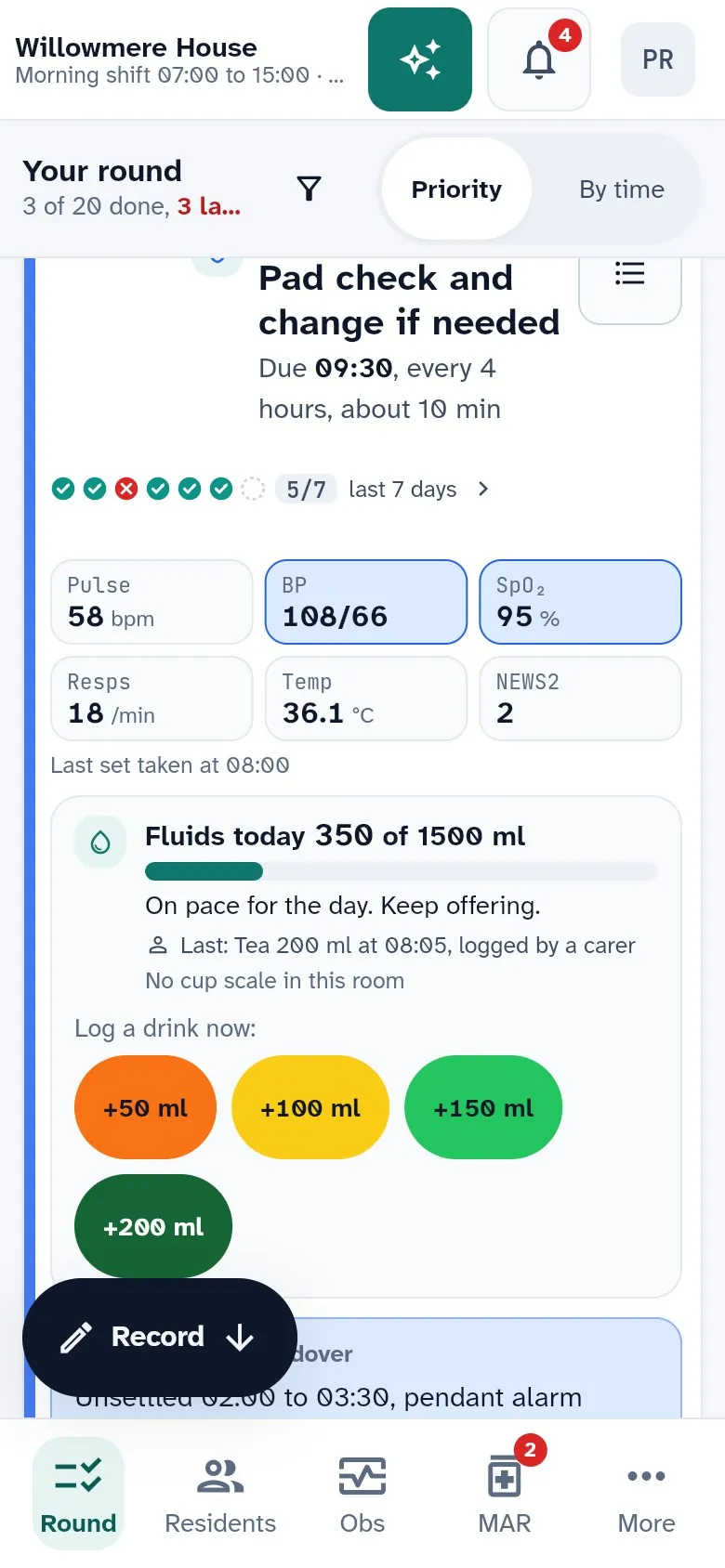
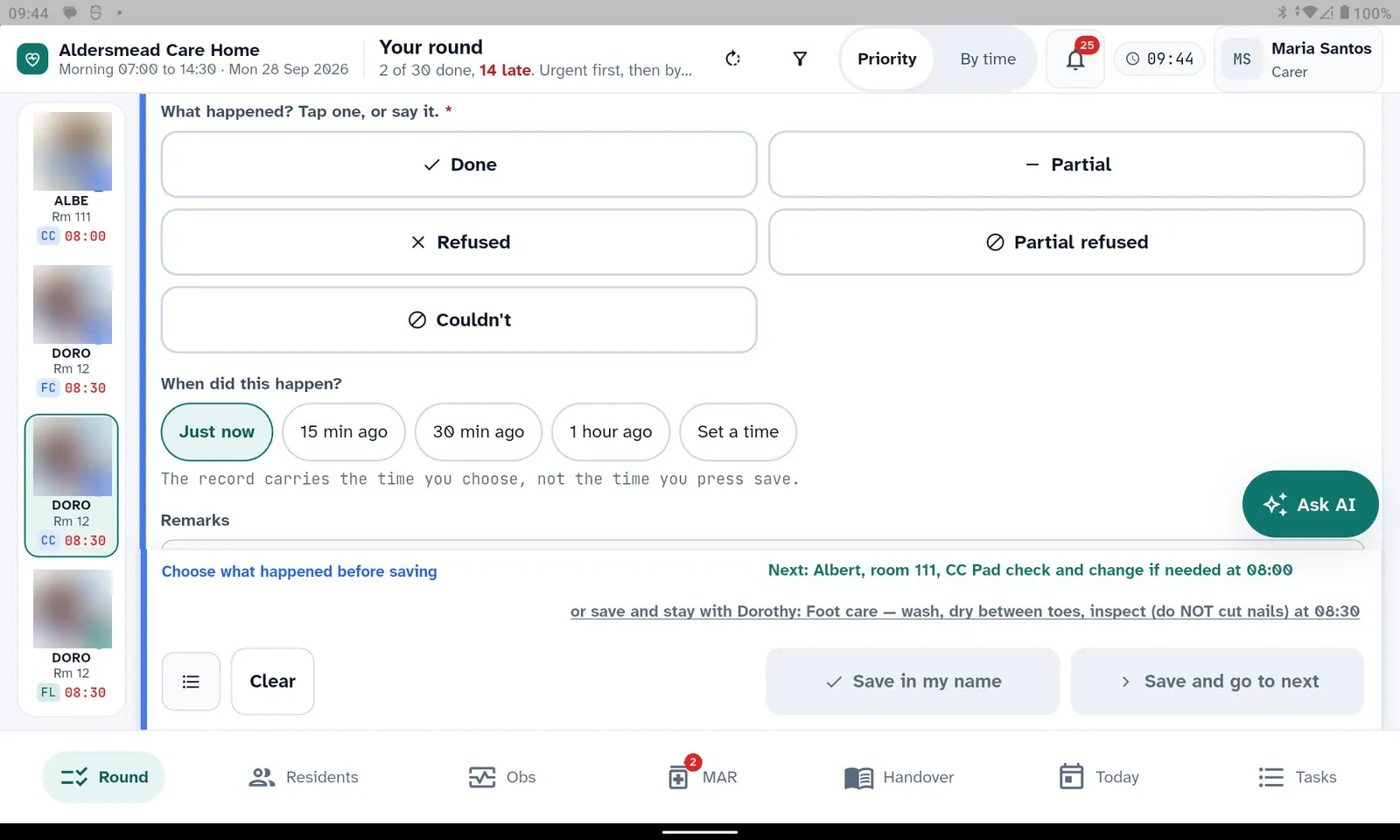
The same app on a tablet and on a phone. Fictional demo data; photos and surnames blurred.
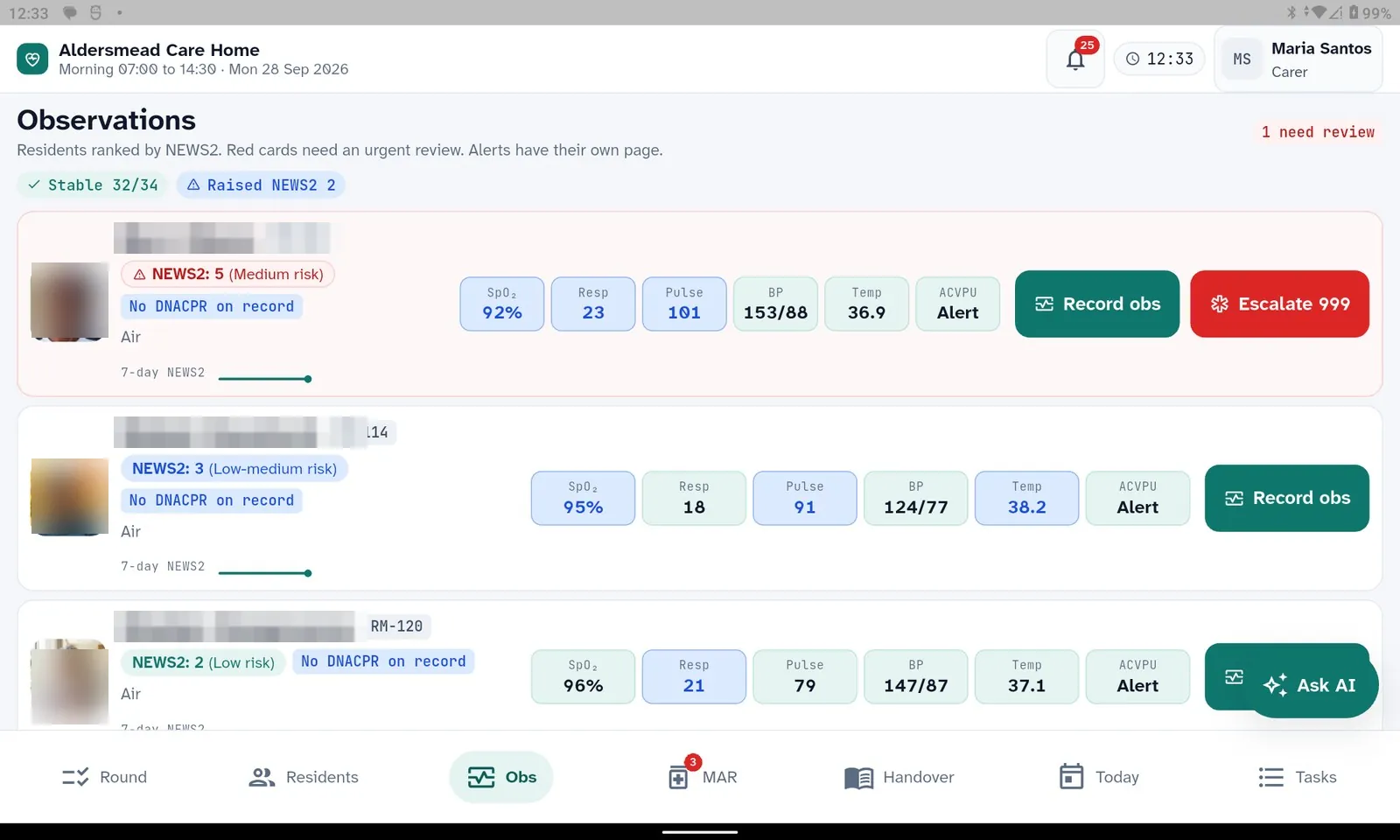
Observations ranked by NEWS2; the red card carries Escalate 999.
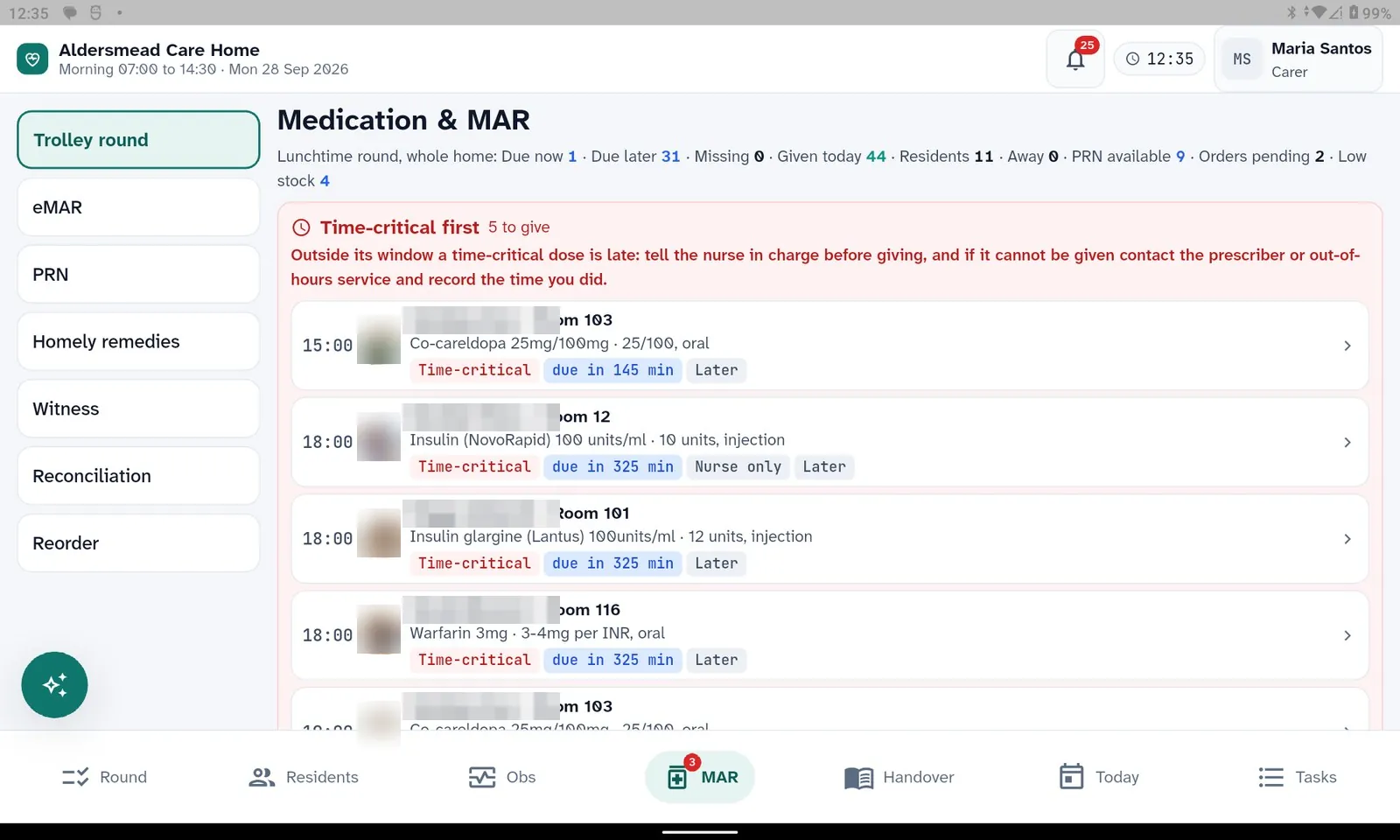
The trolley round, time-critical doses first, with the rule for a late dose on screen.
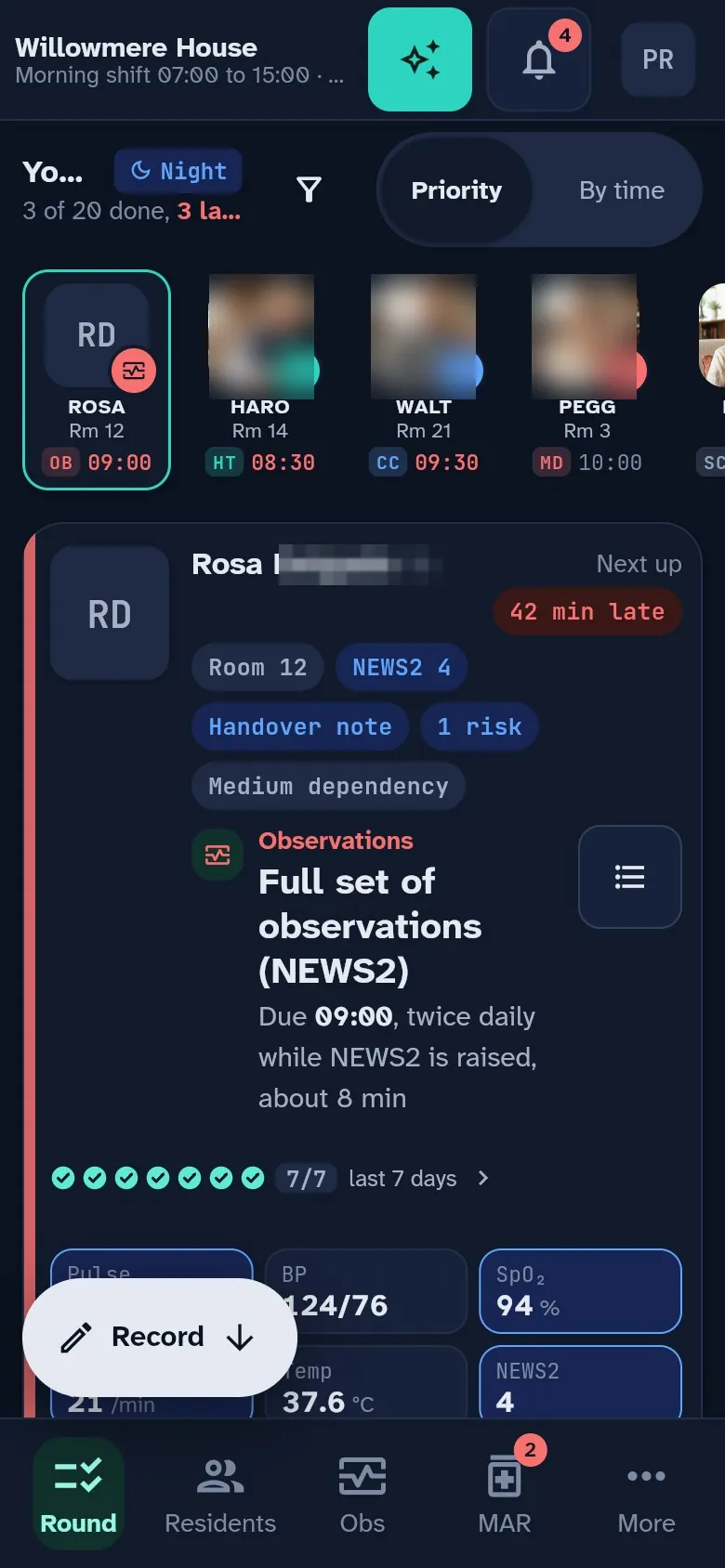
Night mode on a phone.
The fluid card on a phone.
Recording by form: what happened, when, and a save bar that waits for a choice.
Handover: what is outstanding for the next shift, and the flag that makes it a critical point.
AI proposes. A named person confirms. Everything is logged.
The model is not pinned to one vendor and will change as better models ship. What does not change is the boundary around it: masked identity in, a proposal out, a human decision, an audit row.
Identity masked before any AI callNames, NHS numbers and other identifiers are replaced by stable per-home aliases that carry no signal; clinical substance is kept so the model can reason. The answer is unmasked against an exact allow-list of issued aliases, so an alias the model invented is left alone and flagged.
Human confirmation of every proposalCare insights, medicines review, deprescribing signals, compliance mappings, allocation drafts and handover drafts all land as proposals or drafts. Nothing changes a medicine, a care plan, a threshold or a risk flag until a person with the right permission accepts it.
Deterministic firstAlerts, handovers, meal plans and the daily plan are complete without AI; the model only polishes wording or adds a narrative, and falls back to scripted text if it is not configured or fails.
Audit trail and retentionEvery AI call is logged with its masked prompt and response, and pruned after a configurable retention period. Every human action on a proposal is recorded with the reason given.
Grounded answers for ownersThe Owner Copilot checks each figure against the data it came from; a figure that fails grounding is replaced by a scripted answer that says what could not be measured.
Ask AI and voice
In the manager web app, Ask AI is scoped to the resident and the pane on screen, and the on-screen summary is masked before it is sent. On the tablet, voice recording asks one question at a time, reads it aloud, shows what it heard and waits for the carer to confirm. A chat mode greets the carer, shows the resident, the task, NEWS2 and allergies, and asks one thing at a time.
A voice pipeline for care records extracts structured records from what was said, resolves each subject to a resident on the round, and hands every decision to deterministic rules that can be tested without a model.
Speech recognition runs on the device. The AI model is configured per home and can be swapped without a redeploy.
The agents in the code today from the source
Thirty-two scheduled agents for the UK product. Each one is switched on per home, and most are deterministic first. One line each, from the source.
Care and clinical
Proactive alert
Every 15 minutes: residents with an active care plan but no observations in 24 hours, and doses not given.
Care-steps planner
Overnight: expands each resident's care plan into today's timed and as-required steps, with optional AI suggestions.
Care insights
Nightly: mines the last 7 days for meal refusals, fluid below target, MAR exceptions, repeated skips and overdue reviews; drafts proposals.
Resident insights
Nightly: a per-resident clinical summary of the day just ended, narrated with masked data.
Handover draft
Drafts an SBAR handover from the shift's real signals; a nurse reviews and finalises.
Routine sign-off watch
After the cutoff hour, nudges the management line about a daily routine not yet signed off.
Escalation overdue watch
Each morning: a digest of escalations past their due date.
Device trends
Multi-day telemetry trends (SpO2, resting heart rate, mobility, night-time events) to the management line.
Adverse drug event signal
A new medicine followed by a rising NEWS2 is flagged for clinical review; never changes a medicine.
Medicines
Med round watch
A dose with nothing recorded after its grace window, and a refusal streak that needs a prescriber review.
Medication change watch
Verbal changes without written confirmation, a daily digest of changes, and repair of undelivered escalations.
Medication review
Anticholinergic burden, polypharmacy and STOPP signals, flagged for a pharmacist or GP.
Omission pattern
Nightly: where omissions cluster by staff, slot and weekday; no resident named.
Medicines safety digest
Weekly: the medicines dashboard as one kept safety insight.
Medication stock alert
Medicines at or under their reorder point, one summary per manager per day.
Fluids and nutrition
Fluid rules
Every 15 minutes: gap and checkpoint rules against each resident's fluid target or limit.
Hydration device watch
Every 5 minutes: a silent or dead hydration device is flagged, even in demo mode.
Meal plan generator
A daily meal plan from the diet order, texture, MUST score, allergies and fluid target.
Meal service scheduler
Keeps today's and tomorrow's meal services in place for every kitchen-enabled home.
Compliance and workforce
Compliance validation
Fourteen checks including care plan review overdue, qualification expiry, training overdue and DBS re-check.
Onboarding nudge
Chases incomplete onboarding records, daily while the core set is incomplete.
Workforce analytics
Bradford factor concern, the 48-hour working time limit and agency reliance.
Vetting access watch
An unusual sweep of different staff members' vetting records is flagged.
Vetting retention
Deletes staff vetting data on the documented retention schedule.
AI call log retention
Prunes the masked AI call log after a configurable number of days.
Operations and stock
Allocation auto-draft
Drafts next week's caregiver allocation for a manager to approve; never overwrites an approved plan.
Insight runs
Runs each home's saved insight configurations on their daily or weekly cadence.
Inventory reorder
Stock at or below its reorder point, with the 30-day burn rate.
Inventory expiry
Lots expiring within 14 days, with a first-expired-first-out order.
Inventory anomaly
A spike in a resident's consumption of opted-in clinical products, flagged for review without a diagnosis.
Owners and finance
Owner weekly brief
A grounded weekly portfolio brief to each director and regional manager, scoped to their homes.
Payroll and invoice outbound
Pushes queued timesheets to Xero Payroll UK or Employment Hero and invoices to QuickBooks Online, one job at a time with safe retry.
What each role gets, from the same record
The manager web app is organised into twelve menu groups. Here is what each role sees, taken from the menu as it ships.
Owners and directors
Owner console: portfolio analytics, home comparison, reports drawer.
Owner Copilot and the weekly brief across every home in the group.
Occupancy, bed map, enquiries and intake.
Funding, invoicing, budgets and accounting integration.
Regional command centre for regional managers.
Registered managers
Manager command centre: daily, weekly and monthly routines with sign-off.
Staff hub, records, training matrix, leave, workforce compliance, payroll.
Workforce insights: Bradford factor, working time, agency reliance.
Access control with per-home role clones and per-resident restrictions.
HIRA Family portal: approved diary entries, photos and messages for one resident.
12menu groups in the manager web app
32scheduled background agents in the code
3 + 1apps for staff, plus the room display and family portal
The care plan is the plan for the day
A need holds its interventions; each intervention has a frequency and a method; the planner places them in the resident's own day, around their get-up, meal sittings and settle time. The eMAR round sits on the same record, with the same allergies in red everywhere.
Dependency band and required hours from the CareTally instrument.
Standing instructions and preferences on the resident's card, read by every app.
Every step records who did it, when, and what they saw; a skipped step records why.
The residents shown are fictional demo data; photos and surnames are blurred. The screen structure is real.
The round step comes from the care plan, with the fluid card and quick actions on the same screen.
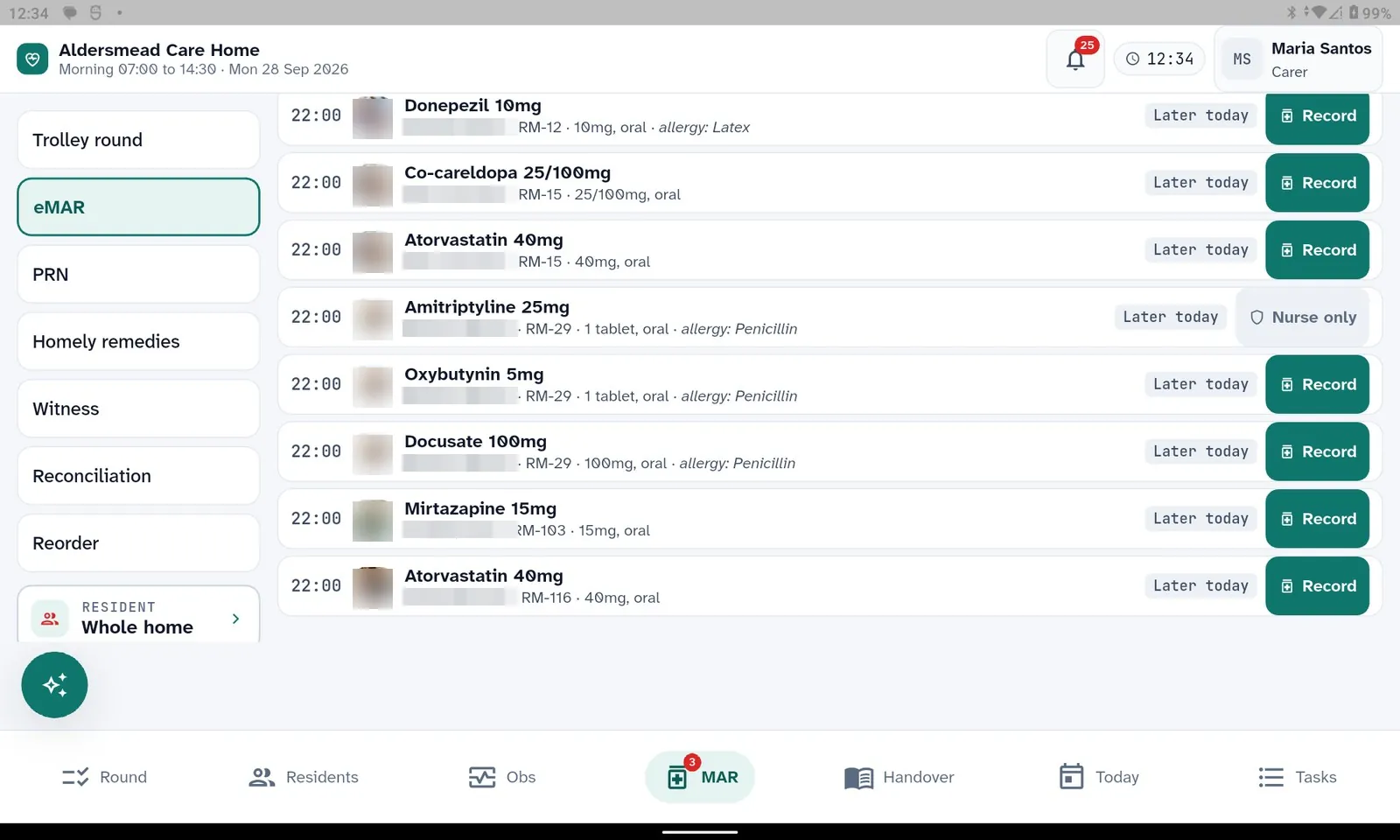
The eMAR round on the same record. Allergies beside every line.
Evidence at inspection, as a by-product of care
Two claims we make, and the practices behind them that you can see in the product.
Mapped to the CQC single assessment frameworkThe command centre carries a readiness view over the framework, and the compliance layer evaluates confirmed policy clauses against operational records.
UK GDPRData minimisation at every AI boundary, retention schedules enforced in code, and access that is restricted per resident and audited per read.
Role-based access with per-home rolesPermissions live on the role; each home can clone a role and adjust it, and the server resolves the base role so a renamed clone cannot gain or lose access by accident.
Per-resident restrictions and break-glassA manager can restrict a resident's record to named staff. Everyone else sees that it is restricted, never a blank. A break-glass read is an append-only audit event.
PII masked before any AI callStable aliases replace identity on the way to the model and are reversed on the way back; the masked prompt and response are what gets logged.
Append-only audit of every writeCreates, updates, approvals and critical actions carry the actor, the before and after values and, where it matters, the reason.
Photography consentOne consent predicate decides where a photo may appear; revoking family-app consent removes already shared photos from the family feed.
Retention enforced in codeStaff vetting data and the AI call log are pruned on documented schedules; retention is configurable, with an explicit off switch.
Pharmacy ordering without clinical data in emailA reorder email carries the home, priority, counts and a reference only; the order itself is viewed in HIRA.
Human in the loop by designAgents file proposals; a person with the right permission accepts or rejects; the decision and reason are recorded.
Tenant isolation in every queryEvery read and write carries the home as a predicate, and resident lookups are home-filtered; a record from another home reads as not found.
One price per registered bed. Every module. Unlimited users.
No add-ons, no per-module pricing, no user licences. The price is the same whether the bed is occupied or not, so the bill does not change with occupancy.
£10 ex VAT
per registered bed per month, billed monthly
Every module: care planning, eMAR, handover, rostering, finance, compliance, kitchen, inventory, staff management, family portal.
All three apps and the room display; unlimited users and devices.
Owner Copilot, Ask AI and every background agent.
UK support, and the import readiness process for a home moving from another system.
Switch to annual billing to pay for 10 months and get 12.
Groups of five or more homes: the Owner Copilot, the weekly brief and the regional command centre are included at the same per-bed rate. Ask us about a group agreement and a staged rollout.
Questions owners ask
We are on another system. How does moving to HIRA work?
Your export is mapped by an adapter (CSV, JSON, or a supported vendor export) into HIRA's import envelope. A dry run writes nothing and tells you which residents resolved, how many rows per domain and what is wrong with the source. The import then runs one resident at a time, reporting what landed with the real clinical date span read back from the database, and each batch can be verified and undone on its own.
The mapping report leads with the columns the import did not consume, and the onboarding tracker shows per resident whether care is safe to start and what is still missing. So you see, before go-live, what your old system never recorded. Single residents can also be brought in from a pasted referral, a PDF or a connector through the intake wizard.
Is HIRA a digital social care record, and what about assured supplier funding?
HIRA is a digital social care record. Assured-supplier listing is not something we claim today; ask us about funding routes for your home.
Does eMAR connect to our pharmacy?
HIRA's eMAR holds the MAR, scheduled and PRN rounds, controlled drugs, homely remedies and witness confirmation. Medication supply tracks stock per medicine with reorder points, and the reorder flow sends your pharmacy a notification email that carries the home, the priority, item counts and a reference only; the order itself is viewed in HIRA. There is no direct electronic ordering link into pharmacy systems today, and we say so rather than promise one.
What does "per bed" mean, exactly?
Ten pounds per registered bed per month, ex VAT, for the beds on your CQC registration, occupied or not. That one price includes every module, all three apps, the room display and family portal, the Owner Copilot and every background agent, and as many users and devices as you need. There are no add-ons, no per-module pricing and no user licences. Annual billing is charged as ten months.
Who owns the data, and what happens if we leave?
The home is the data controller; Involgix processes the data on your instructions, and your resident, staff and operational records remain yours. On exit your data is exported to you in open formats and then deleted, on the terms and timescales set out in the written agreement. The retention schedules HIRA enforces in code, for staff vetting data and the AI call log, are documented and configurable.
Does the tablet work without wifi?
Yes, for care records. A record saved without a connection is kept on the device in encrypted storage with the keys it needs and sends itself when the connection is back; sending twice cannot make two records. The handover sign-off can be kept the same way. Medicines, PRN, homely remedies and witness confirmations are never kept to send later: a medicine is recorded while connected or not at all. A record that was refused because the resident's record is restricted for that carer will not send on its own, and the app says so.
See your own questions answered on screen
A demo is a video call with the manager web, HIRA Care Web and the tablet app side by side.
Bring a day in your home: we will show the manager's routine, a carer's round and a handover for it.
Bring an export from your current system if you want to see the import dry run.